Blue Ledger logoBLUE LEDGER
KNOW WHAT IS ON THE SHELF

Inventory management software for Kenyan shops.

Receiving stock, selling it and moving it between locations should leave a record you can follow. Blue Ledger connects your POS to goods received, on-hand quantities, stock movements and inventory reports, so you can review the stock behind your sales.

Explore pricing & setup
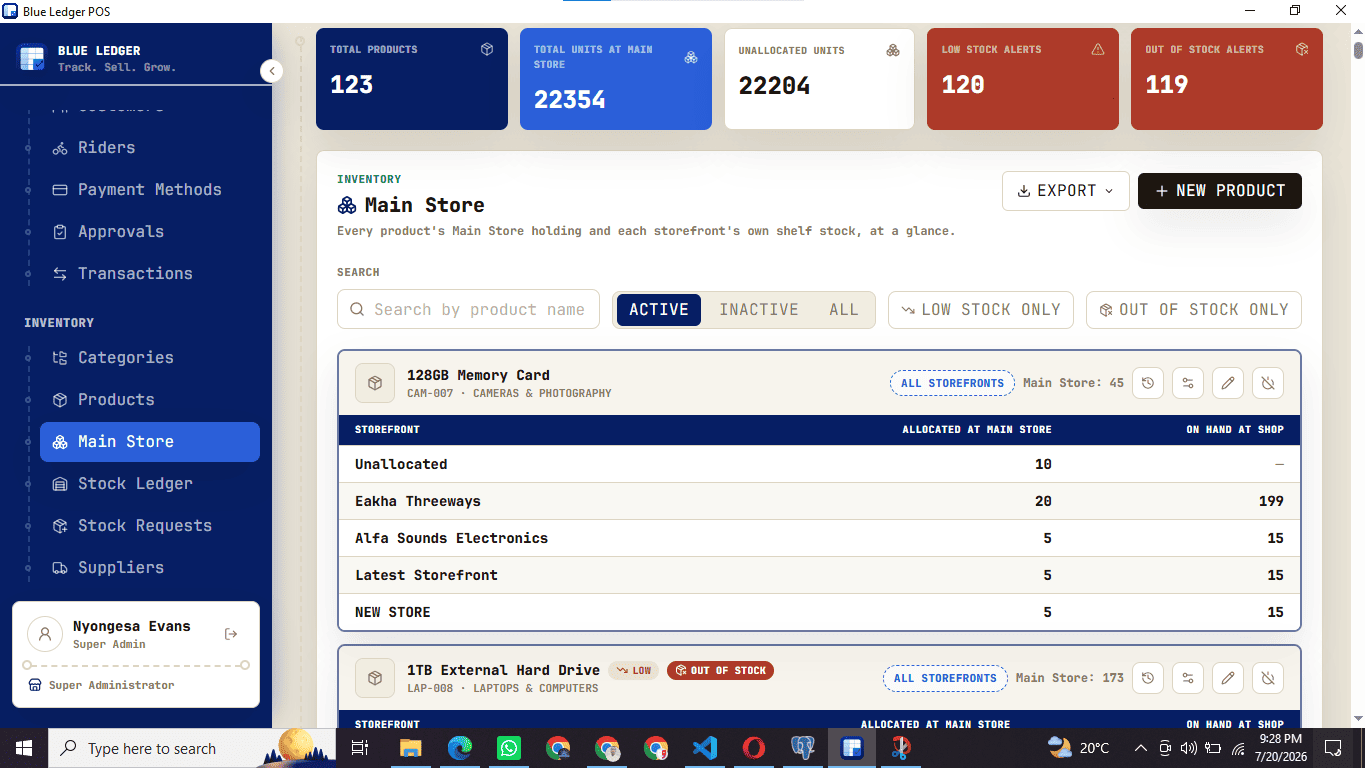
Blue Ledger inventory screen showing main store quantities, storefront allocations and stock levels
Blue Ledger inventory screen showing main store quantities, storefront allocations and stock levels.
  • Goods received and supplier records
  • Main store and storefront stock
  • Low-stock visibility and valuation
01

Record the delivery before it becomes shelf stock.

Start the stock trail when a supplier delivery arrives. Book the received quantities into the main store or a branch, link the supplier and purchase order, and keep the supplier receipt with the record. Before-and-after stock levels provide a reference when you later reconcile what came in.

  • Check quantities as goods arrive.
  • Keep the supplier paperwork attached to the receiving record.
  • Review the intake history when reconciling stock.
02

Follow stock from the main store to the selling shelf.

Keep bulk stock in a main store and allocate units to storefronts. Transfers between locations create matching stock-in and stock-out records, giving you a trail to inspect when a shelf count needs explaining. Checkout and stock control stay within the same business system.

  • See the stock held at each selling location.
  • Review transfers between the main store and storefronts.
  • Look up a product's movement history rather than relying on a remembered count.
03

Use stock levels and movement to plan the next order.

Low-stock visibility helps you notice products that need attention. Inventory valuation shows what you are holding, while product reports help identify fast and slow movers. For a retail or wholesale shop in Kenya, those views support buying decisions with records from your own counter.

  • Check on-hand quantities and low-stock alerts.
  • Review inventory value by location.
  • Use product movement reports when planning replenishment.

A stock trail from delivery to sale.

Use one product in the demo to see how the records connect.

  1. STEP 1

    Receive it

    Record the supplier delivery and the quantities entering the main store or branch.

  2. STEP 2

    Place it

    Allocate or transfer stock to the storefront where it will be sold, keeping a record of the movement.

  3. STEP 3

    Review it

    Check sales, remaining on-hand quantities and movement history when reviewing the product.

Questions about inventory management.

Does Blue Ledger include inventory management with the POS?

Blue Ledger connects sales with stock records, goods received, transfers and inventory reporting. Ask the team to confirm the plan and setup that cover your locations and workflows.

Can I move stock between shops?

Yes. The inventory workflow supports movements from a main store to a storefront and transfers between branches, with matching stock-in and stock-out records.

Can I import an existing product list?

The supported import workflow accepts product data from CSV or Excel. Review your export, product fields and opening quantities with the team as part of onboarding.

Can I see stock value and slow-moving products?

Inventory reports show stock holdings and value, and product reports show movement over time, including fast and slow movers. Ask to see those views with sample products in a demo.

See this workflow in your shop.

Talk to the Blue Ledger team about your setup and arrange a walkthrough with the tasks your staff use every day.